You launch an ad campaign. People visit your site, look at a product, and add it to their cart. The sale seems almost complete.
Then the customer closes the page.
The advertising money has already been spent. The traffic arrived. The shopper was interested in the product. But there’s no order.
This is one of the most frustrating problems in e-commerce: a store can lose sales not because it lacks visitors, but because the site fails to turn interested shoppers into paying customers.
According to Baymard Institute, the average cart abandonment rate across 50 compiled studies is 70.22%. This is an average drawn from different studies, not a benchmark every store should be measured against. The actual rate depends on the country, product category, device, traffic source, calculation method, and what your analytics defines as a cart.
In Baymard’s research into abandonment reasons, 42% of US online shoppers said they had abandoned a cart because they were just browsing or were not yet ready to buy. Among other reasons cited in the study by shoppers who were ready to consider a purchase were extra costs being too high—40%, slow delivery—20%, not trusting the site with their card details—19%, being required to create an account—18%, and a checkout process that was too long or complicated—17%.
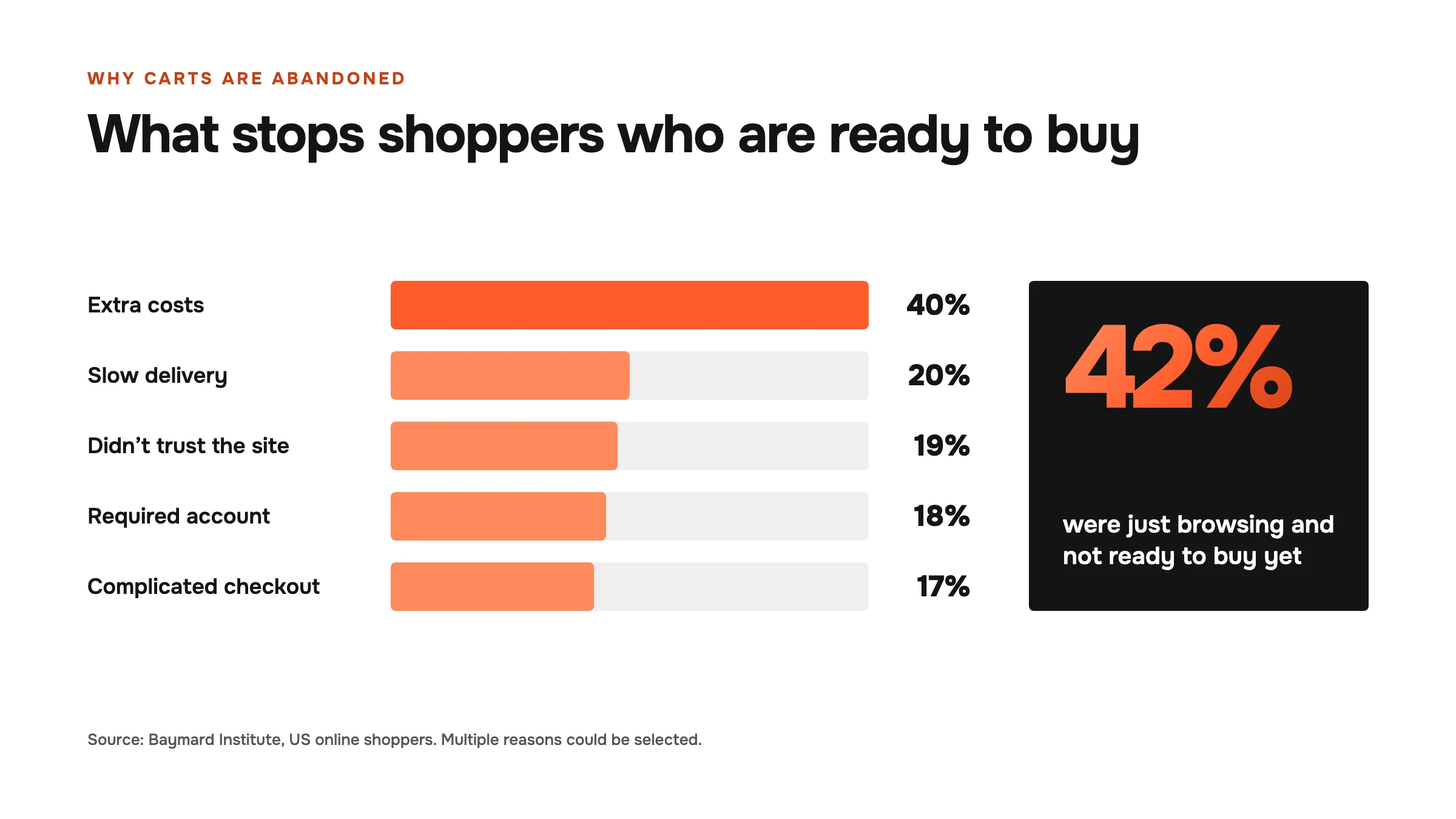
These percentages should not be applied across all countries and categories without context. Respondents could select multiple reasons, and some of the data relates specifically to US online shoppers. The value lies elsewhere: the findings highlight barriers that a store can investigate and often remove. Before increasing your advertising budget, it’s worth checking whether your store is ready to handle and convert that traffic.
Advertising Doesn’t Make the Sale on Its Own
Advertising serves a specific purpose: it captures attention and brings a potential customer to your website or marketplace.
From that point on, the sale depends on the store.
When someone clicks an ad, they move through several stages:
- See the message or creative.
- Land on the product page.
- Check whether the product meets their expectations.
- Evaluate the price, delivery, return policy, and whether they trust the brand.
- Add the product to their cart.
- Enter their contact and payment details.
- Complete payment.
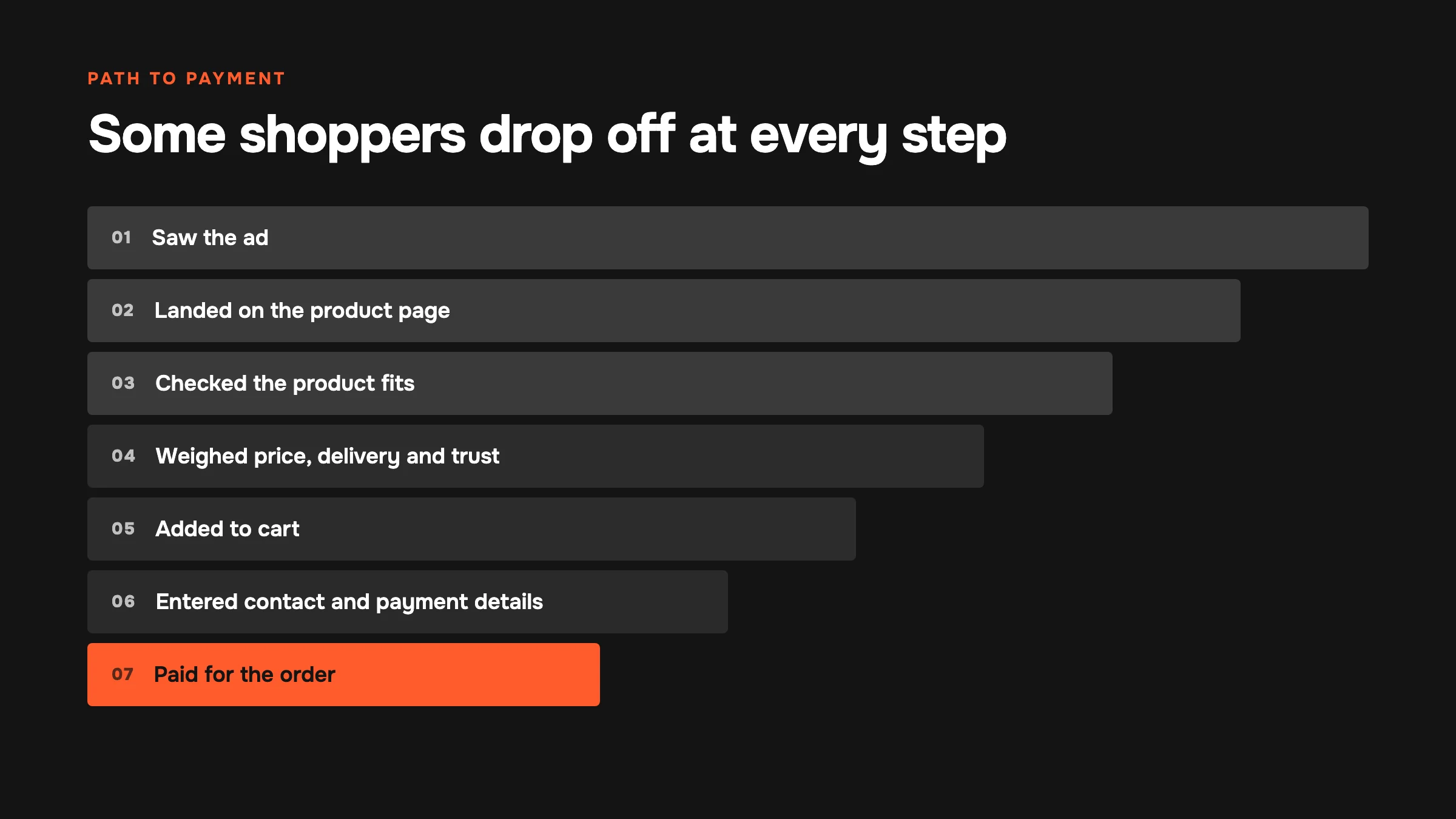
Some people drop off at every stage. If the advertising is well configured but the product page is unclear, the store will lose some of the traffic it has already paid for. If the product page is persuasive but checkout is complicated, money will be spent attracting shoppers who never complete payment.
That’s why advertising and the website need to work as one system. Your ad budget simply brings more people into the funnel. It doesn’t fix a slow site, unexpected shipping costs, missing payment options, or a lack of trust in the brand.
How Much Is Your Store Really Losing?
Let’s look at a simple example.
Imagine a store spends $1,000 on advertising and receives 10,000 clicks. The average cost per click is $0.10.
If the site converts 1% of visitors, the store receives 100 orders. If the average contribution per order after product costs, shipping, and fees is $20, the total contribution to profit is $2,000.
If improvements to the product page and checkout raise the conversion rate to just 1.5%, the store receives 150 orders from the same paid traffic. Under the same conditions, that means a $3,000 contribution to profit.
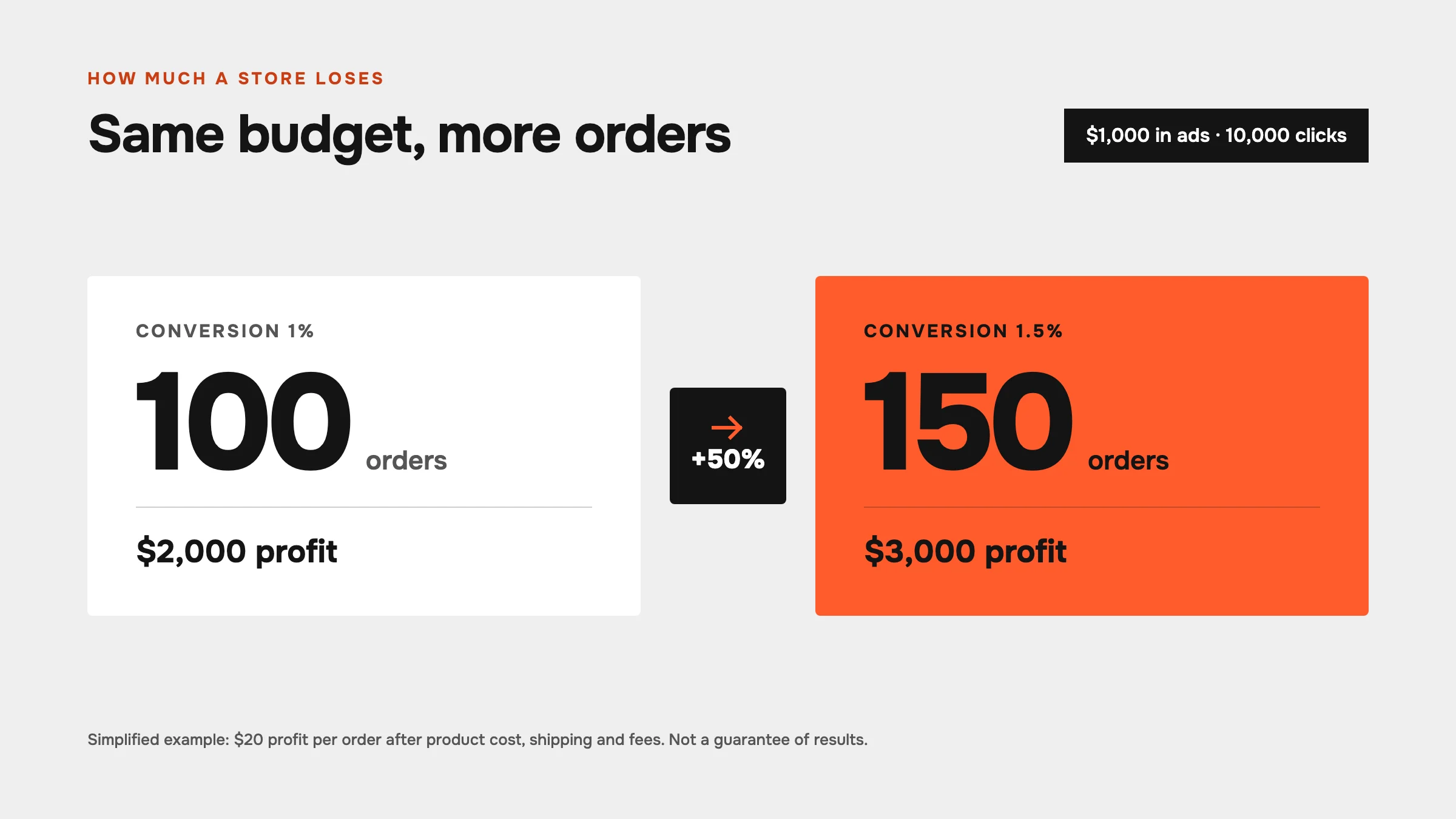
The difference didn’t come from more impressions or a larger budget. It came from more of the visitors already acquired completing their purchases.
This is a simplified example, not a guarantee of results. The actual impact depends on margins, traffic quality, product category, seasonality, pricing, and the site’s technical condition. But it illustrates the principle clearly: sometimes the next growth opportunity is on your website, not in your ad account.
Want to know how many orders your store misses out on from traffic you’ve already paid for? We’ll walk through your funnel from ad to payment and show where shoppers drop off.
Why Do Shoppers Abandon Their Carts?
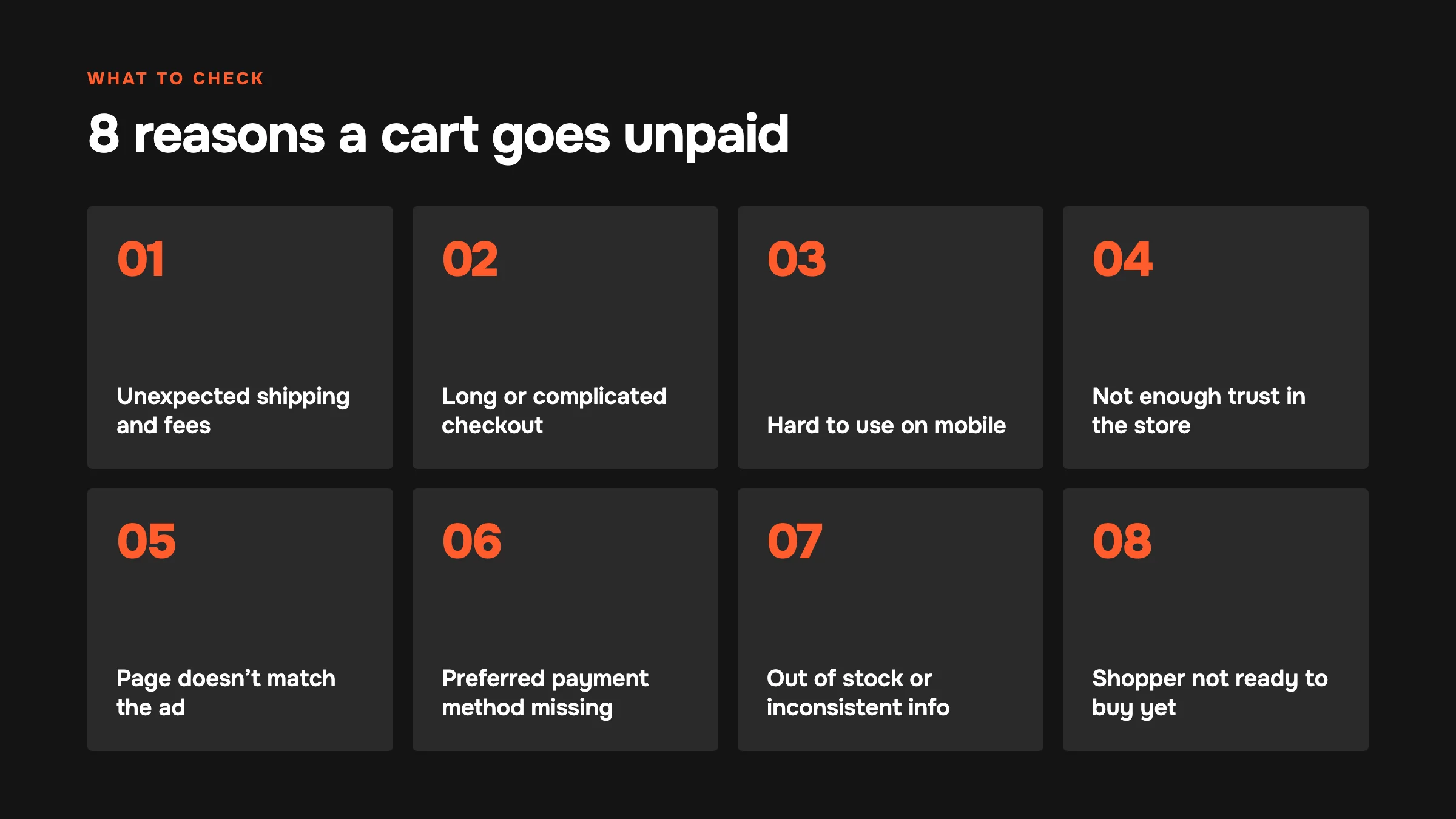
1. Unexpected Shipping Costs or Extra Charges
The customer sees one price on the product page, then encounters a different total at checkout because of shipping, taxes, payment fees, or minimum order requirements.
To the shopper, this doesn’t feel like a “technical detail.” It feels like the rules have changed mid-purchase. They may have been willing to pay €50, but not the €65 they only discover at the final step.
What to do:
- Show shipping costs, or explain them clearly, on the product page.
- State the order value required for free shipping.
- Show the full total before the customer clicks the payment button.
- Don’t add mandatory fees at the last moment.
- Check that pricing is consistent across the ad, product page, cart, and checkout.
Google explicitly requires pricing, product availability, and purchase terms to be consistent across the product ad, product page, and checkout.
2. A Long or Complicated Checkout
Every unnecessary field adds work for the customer. This is especially true on mobile, where entering an address, phone number, and payment details takes more time.
Problems arise when a store:
- Requires customers to create an account before buying.
- Requests information that isn’t needed for delivery.
- Splits a simple purchase into too many steps.
- Doesn’t explain what happens after a button is clicked.
- Loses entered information after an error.
- Displays unclear error messages.
Google recommends allowing guest checkout or simple verification with a one-time code, and avoiding barriers to completing a purchase.
3. The Site Is Difficult to Use on Mobile
Advertising often brings shoppers to your store on smartphones. If the product page loads slowly, the “Add to Cart” button is hard to find, or the checkout form is awkward to use with a thumb, the store can lose potential orders before price even becomes an issue.
Don’t test the mobile experience only in developer mode on a laptop. Open the site on an actual phone and complete the entire journey, from the ad link to payment confirmation.
Check:
- Is the essential information visible without extensive scrolling?
- Is it easy to select a product variant, size, or quantity?
- Is the purchase button large enough?
- Do banners, pop-ups, or the keyboard cover the form?
- Do Apple Pay, Google Pay, and other express payment options work?
- Does the customer have to enter the same address multiple times?
4. Not Enough Trust
A customer may want the product but not trust the store.
This is particularly important for a first purchase from a brand, expensive products, cosmetics, health products, and international delivery. Shoppers want to know who is selling the product, when it will arrive, how to return it, and who to contact if something goes wrong.
Trust is strengthened by:
- Clear company information and contact details.
- Genuine reviews and customer photos.
- Clear shipping and return policies.
- A secure HTTPS connection and familiar payment providers.
- Easy-to-find support before and after the purchase.
- Specific answers to product questions.
- No exaggerated promises.
A trust badge alone won’t rescue a weak offer. Trust is built through the details across the entire customer journey.
5. The Product Page Doesn’t Match the Ad
A customer clicks an ad for a particular bundle, color, or offer, but lands on a general category page. Or the ad promises a discount that isn’t visible on the site.
This creates a mismatch between expectations and reality. The shopper has to search again for the product they were promised—or concludes that the ad was misleading.
Every ad campaign should lead to a relevant page that carries the same offer through:
- The same product or bundle.
- The same price or promotional terms.
- The same key selling point.
- A clear next step.
6. The Preferred Payment Method Isn’t Available
A customer may not have a card on a supported network, may not want to enter their card details, or may be used to a local wallet, bank transfer, or payment on delivery.
For an international store, it’s important to consider both the country and the customer segment. A payment method that works well in one market may be inconvenient in another.
That doesn’t mean adding dozens of options without analysis. Instead, identify your audience’s main payment methods, make them easy to find, and check for errors during actual transactions.
7. The Product Is Unavailable or the Information Is Inconsistent
If an ad shows a product as available but it can’t be purchased on the product page or at checkout, the store loses both the order and the customer’s trust.
Keep the following in sync:
- Inventory levels.
- In-stock status.
- Product variants.
- Pricing.
- Dispatch times.
- Information in the advertising product feed.
- Product page and checkout information.
Google specifically states that a product advertised as available must be available to add to the cart and purchase.
8. The Customer Wasn’t Ready to Buy Yet
Adding an item to a cart doesn’t always signal an immediate intention to pay. Someone may be comparing products, waiting for payday, consulting a partner, checking delivery options, or simply saving an item for later.
An abandoned cart doesn’t always mean the store has done something wrong. Even so, it’s important to stay connected with the potential customer.
Useful approaches include:
- An email or message with a link to the unfinished order.
- Product reminders without aggressive pressure.
- Answers to common objections.
- Information about delivery times and returns.
- A personalized offer only where it is genuinely needed.
Shopify lets merchants review abandoned checkouts, investigate failed payments, and send customers a link to resume checkout.
How Can You Identify Where Your Store Loses Customers?
Your overall conversion rate shows only the final outcome. It doesn’t tell you where the problem occurs.
Build a funnel:
- Ad impressions.
- Clicks.
- Website sessions.
- Product page views.
- Add-to-cart actions.
- Checkout starts.
- Contact details entered.
- Payment attempts.
- Completed purchases.
At each stage, look beyond the percentage and break the data down by segment:
- Mobile and desktop traffic.
- Google, Meta, TikTok, Pinterest, and organic search.
- New and returning customers.
- Individual countries and cities.
- Products, categories, and ad campaigns.
- Browsers and payment methods.
For example, the overall conversion rate may look healthy while the mobile checkout abandonment rate is twice as high. Or an ad campaign may generate cheap clicks but almost no purchases because it reaches the wrong audience.
Combine the data with qualitative investigation: session recordings, customer surveys, test purchases, and payment error reviews. Analytics shows where people drop off. It doesn’t always explain why.
What Should You Check Before Increasing Your Ad Budget?
Product Page
- Can visitors understand within a few seconds what the product is and who it is for?
- Are the price, availability, variants, and key benefit visible?
- Are there high-quality photos, videos, or demonstrations of the product in use?
- Is it clear what is included?
- Are questions about size, materials, ingredients or composition, and compatibility answered?
- Are shipping and return terms visible?
- Does the page match the ad?
Cart
- Can customers change the quantity and product variant?
- Are the full price and estimated shipping cost visible?
- Can customers return to the product page without losing their cart?
- Are unwanted services being added automatically?
- Is the next step clear?
Checkout
- Can customers buy without creating an account?
- Does the form request only necessary information?
- Does it work on mobile?
- Are popular local payment methods available?
- Are error messages clear?
- Is entered information retained after an error?
- Are pricing, shipping, and availability consistent with the previous stages?
- Does the customer receive a clear confirmation after payment?
Technical Performance
- Does the landing page linked from the ad load quickly?
- Are analytics or payment scripts failing?
- Do UTM parameters work?
- Are view item, add to cart, begin checkout, and purchase events being sent correctly?
- Are purchases being counted twice in analytics?
- Do any ad links lead to a 404 page, the wrong language version, or an unavailable product?
Don’t want to work through the checklist yourself? We’ll review your product pages, cart, checkout and analytics for you — and give you a prioritised list of fixes.
How Can You Recover Some of Those Lost Customers?
Set Up Abandoned Cart and Abandoned Checkout Messages
The first message should be helpful, not just a reminder that “you forgot something.” You can ask whether the customer needs assistance, show the product, and provide a direct link to resume checkout.
Follow-up messages can address concerns about delivery, returns, sizing, or payment methods. A discount shouldn’t be your only recovery tactic: if everyone receives one, shoppers may start waiting for it.
Use Segmented Remarketing
Someone who only viewed a product and someone who entered their card details are different audiences. They shouldn’t see the same ads.
Possible segments include:
- Viewed a product but didn’t add it to the cart.
- Added an item to the cart but didn’t start checkout.
- Started checkout but didn’t pay.
- Encountered a payment error.
- Made a purchase and may buy a complementary product.
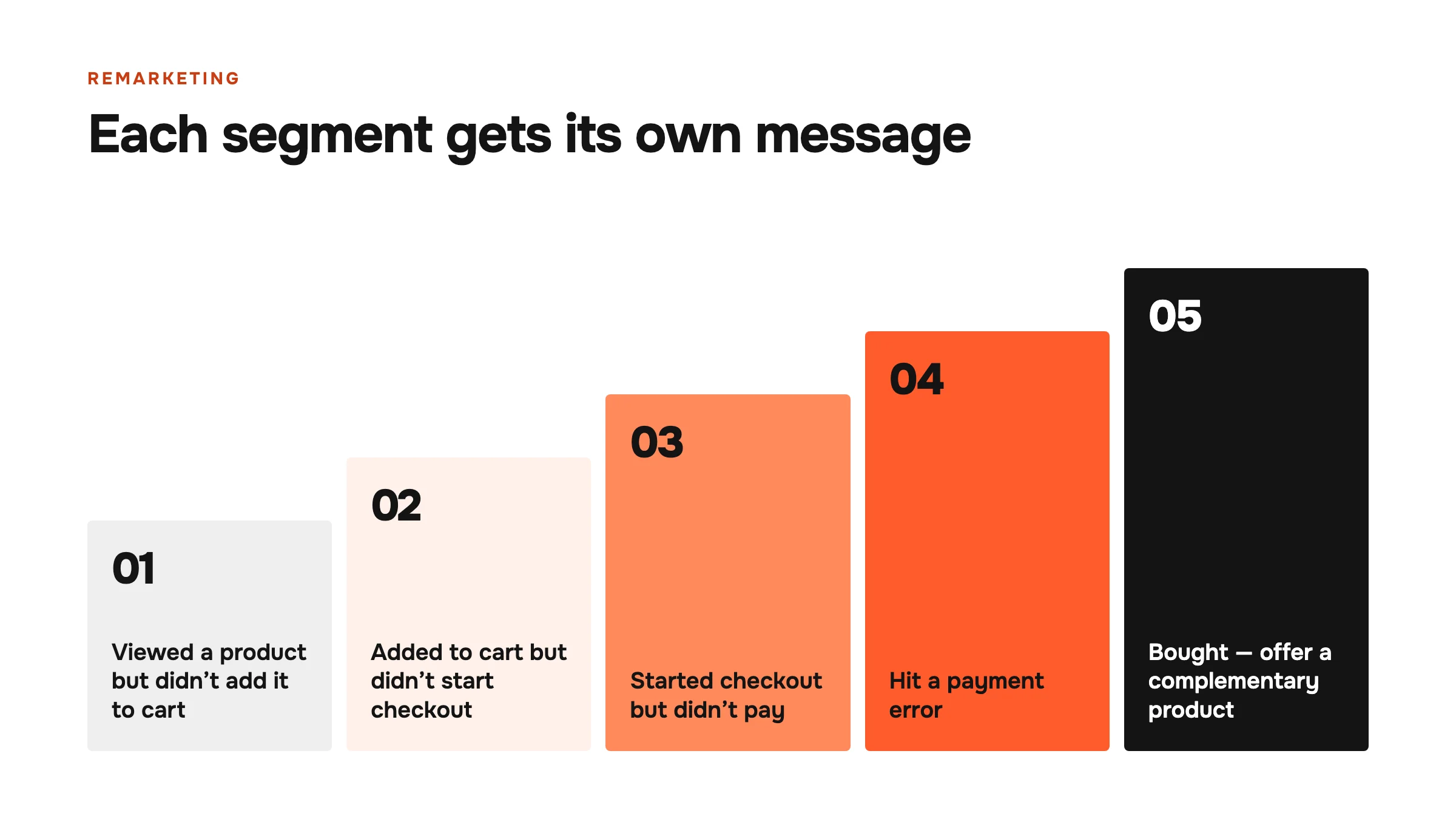
Each group needs its own message and frequency cap. Otherwise, remarketing becomes intrusive.
Build Repeat Sales
The first sale isn’t the only outcome a store should track. If customers can buy the product again, the economics of advertising may look very different when lifetime value (LTV) is taken into account.
Email marketing, CRM, repurchase reminders, recommendations, and loyalty programs can help reduce dependence on constantly acquiring new traffic.
Why Can Store Performance Drop After Peak Season?
Seasonality often masks problems. At peak demand, customers may be willing to buy even through a difficult-to-use website, wait longer for delivery, or overlook weak content.
Once the season ends, the need to buy becomes less urgent. That makes the following issues more apparent:
- Weak differentiation from competitors.
- A lack of repeat sales.
- Dependence on discounts.
- Low conversion rates for mobile traffic.
- Slow or expensive delivery.
- Missing content for shoppers comparing options.
- Poor advertising budget planning.
To avoid an off-season slump, build a system in advance: engage your customer base, test evergreen products, develop SEO and content, nurture demand through email, and don’t judge the entire business solely by its peak-month performance.
What Does a CRO Audit Offer?
CRO stands for conversion rate optimization. Its purpose isn’t simply to make a website look “better.” It is to understand what prevents an interested customer from buying and remove those barriers.
A comprehensive CRO audit may include:
- Funnel and traffic source analysis.
- Product and category page reviews.
- Cart and checkout analysis.
- Mobile and desktop testing.
- Site speed and technical error checks.
- Analysis of payments, delivery, and returns.
- User behavior reviews.
- Ad messaging and landing page reviews.
- A list of hypotheses, priorities, and tests.
It’s important not to implement every change at once without measuring the results. First, identify the biggest points of loss, assess the potential impact, and validate solutions with data.
What Should E-commerce Store Owners Remember?
Advertising doesn’t end at the click. The click is only the start of the journey.
If a store fails to explain the product’s value, hides shipping costs, asks for unnecessary information, runs slowly on mobile, or lacks a convenient payment option, it loses the value of advertising it has already paid for.
Before increasing your budget, check:
- Whether the right audience is landing on the right page.
- Whether the page meets the expectations set by the ad.
- Whether pricing, delivery, and returns are clear.
- Whether checkout creates unnecessary barriers.
- Whether the mobile site, analytics, and payment processing work.
- Whether you have a recovery process for customers who don’t complete their purchases.
- Whether you measure profit, not just clicks and revenue.
The average cart abandonment rate shows the scale of the problem, but it doesn’t diagnose an individual store. Your decisions should be based on your own funnel, customer behavior, and margins.
Koshman Ecom helps e-commerce brands identify where sales are being lost, improve their stores, and develop advertising, SEO, repeat sales, and CRO. The team works with Shopify, other platforms, marketplaces, and B2C/B2B e-commerce projects.
Get a Free E-commerce Store Audit →
Frequently Asked Questions
Is It Normal for Around 70% of Carts to Be Abandoned?
This is an average reference point, not a target or an excuse. Baymard Institute calculated a rate of 70.22% as the average across 50 compiled studies. For an individual store, you need to examine your own data and account for traffic source, device, product, country, and calculation method.
Does an Abandoned Cart Mean Something Is Wrong With the Website?
Not necessarily. Some people postpone their purchase, compare products, or aren’t ready to pay yet. However, a high rate of abandoned checkouts, payment errors, or mobile drop-offs may indicate specific problems that need investigation.
Should You Check the Ads or the Website First?
Check how they work together. If the ads bring in the wrong audience, the site won’t convert. If the audience is right but the page or checkout creates barriers, increasing the budget will simply increase the number of visitors you lose.
Should You Immediately Offer a Discount to Shoppers Who Abandon Their Carts?
No. First, try to understand why they left and address concerns about the product, delivery, returns, or payment. Constant discounts can erode margins and train customers to wait for a better offer.
What Is the Main Reason for Cart Abandonment?
The reasons vary by study, category, and market. Common recurring issues include unexpected extra costs, complicated checkout, mandatory account creation, lack of trust, payment problems, and the absence of a suitable delivery option.
Is Setting Up an Abandoned Cart Email Enough?
No. Messages can bring some shoppers back, but they don’t replace fixing the underlying problem. If shipping is too expensive, payment doesn’t work, or the product page doesn’t match the ad, the email will simply remind the customer why they left.