Google advertising can bring people to your website when they are already searching for your product or service. But a click alone does not mean a sale. If an ad leads to the wrong page, the site is difficult to use on mobile, checkout does not work or conversion tracking is not set up, your ad budget may be spent without a clear result.
Google Ads works best as part of a broader system. That system needs a clear business goal, the right search queries, a relevant landing page, analytics, regular optimisation and an understanding of the business’s economics.
In this article, we’ll cover what Google Ads is, how paid search advertising works, how Search, Shopping and Performance Max differ, what it takes to launch campaigns, and why clicks do not always turn into sales.
What Is Google Ads? A Simple Explanation
Google Ads is Google’s advertising platform. It helps businesses show their products or services to people across Google Search and other Google services. Businesses choose their goals, locations, budgets and audiences, and decide how to measure results.
When someone searches for something like “buy office chair London” or “Shopify development for an online store”, Google may show them an ad from a company offering the relevant product or service.
It is important to distinguish between three different things:
- Ad budget — money spent on impressions or clicks in Google.
- Specialist or agency services — research, setup, management, analytics and optimisation.
- Business results — a lead, phone call, purchase, revenue or new customer.
Advertising can bring a visitor to your website, but their decision to buy also depends on factors such as pricing, your offer, brand trust, site speed, delivery, payment options and the quality of your lead handling.
How Google Paid Search Advertising Works
Paid search advertising is shown in response to a user’s search, interests or behaviour. In Search campaigns, a key signal is what someone is looking for on Google at that moment.
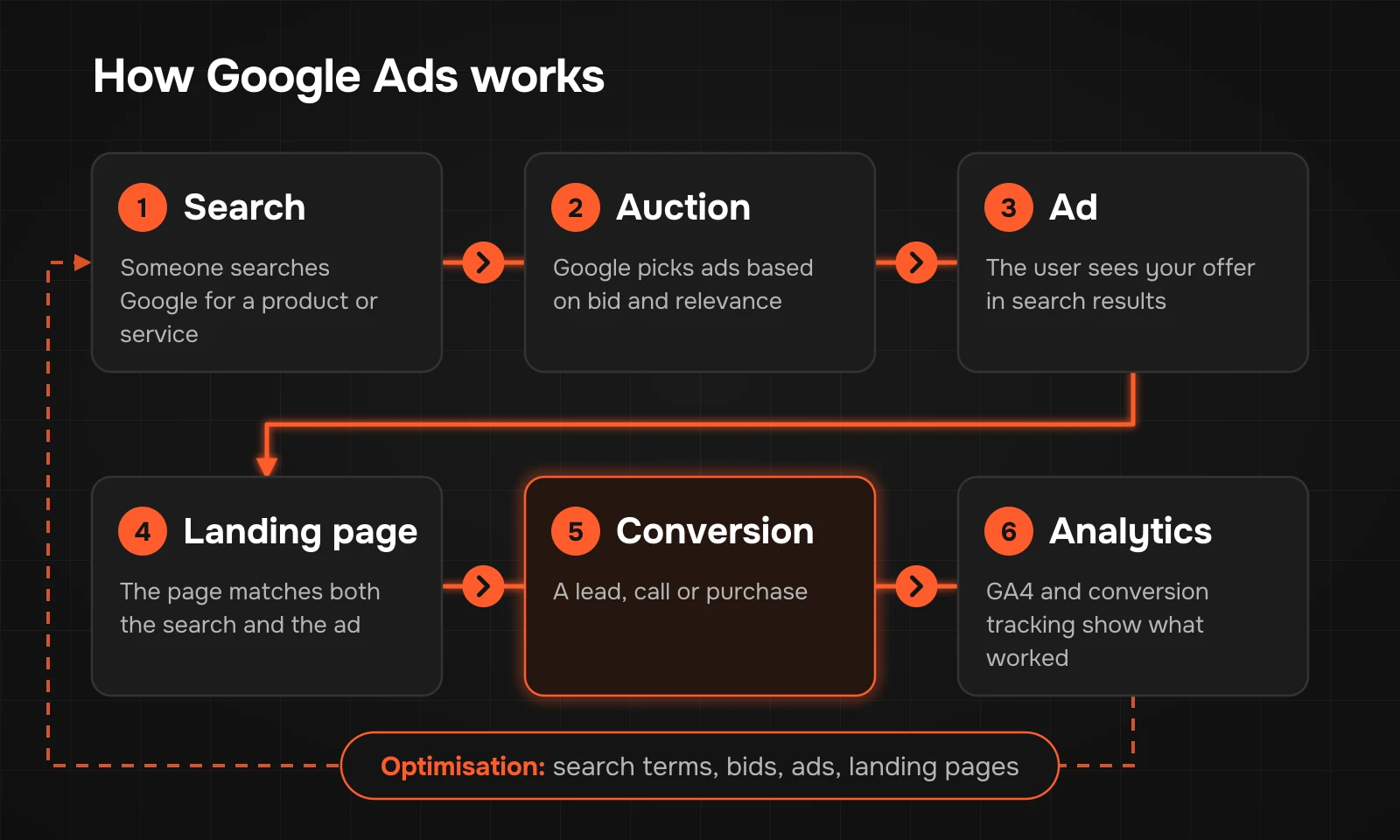
The process, simplified, looks like this:
- A user enters a search query or interacts with content across Google services.
- Google identifies ads that may be relevant to the query or business goal.
- Google runs an ad auction.
- Results are influenced not only by bids, but also by ad relevance, landing page quality and other signals.
- The user clicks through to a website.
- The business measures what happens next: a lead, call, add-to-cart, purchase or revenue.
That is why Google Ads is not simply a matter of “paying more per click”. If an ad does not match the search query and the landing page does not help the visitor take the desired action, increasing the bid will not solve the problem.
What Types of Google Ads Are There?
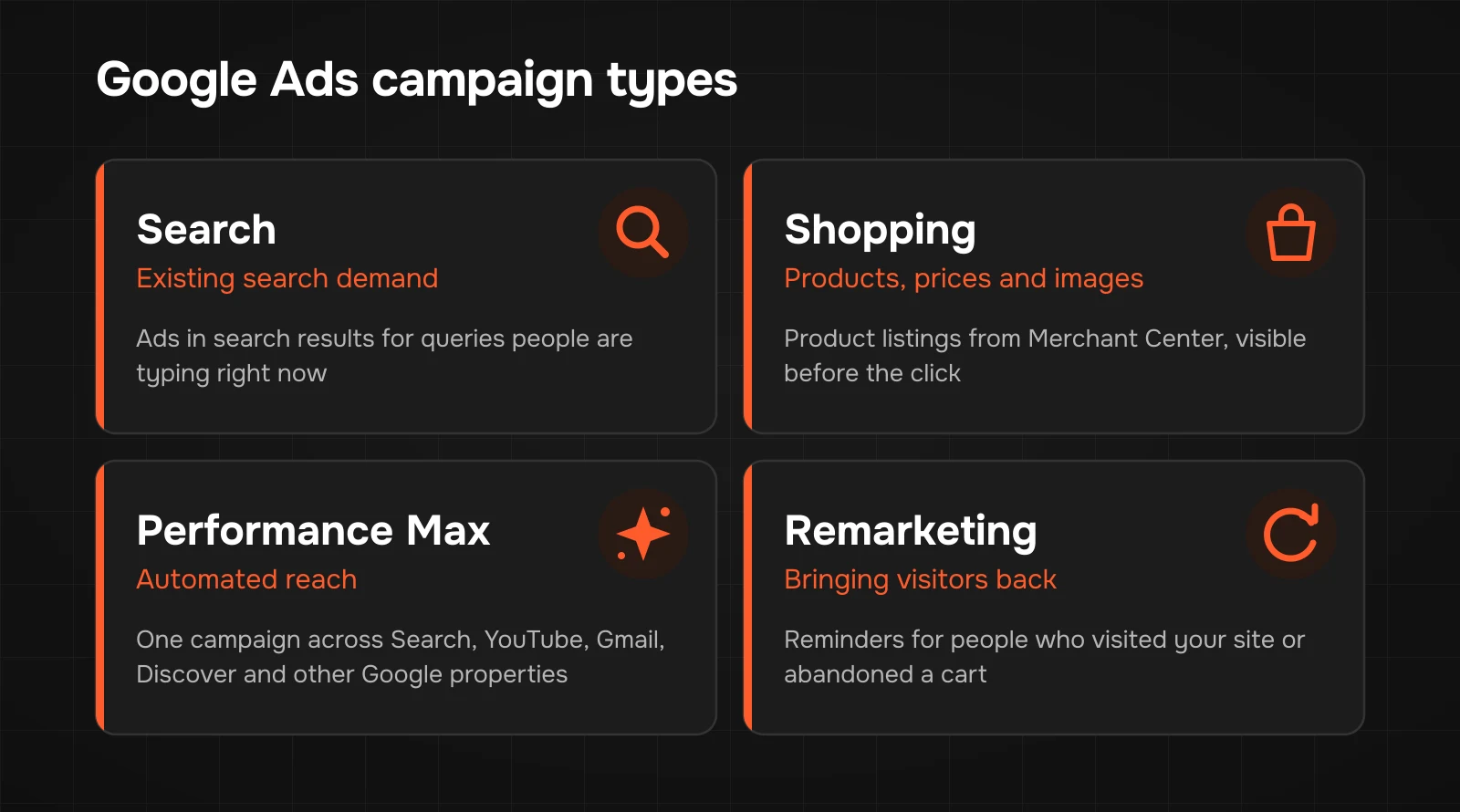
There is no single ad format that works for every business. The right campaign type depends on whether you need to capture existing demand, showcase a product catalogue, find new customers or reach people who have already visited your website.
Search Ads
Search ads appear when someone enters a Google query related to your product or service.
This format can work well for:
- service businesses;
- B2B companies;
- local services;
- ecommerce stores;
- products with established, clearly defined demand.
Search Ads rely on relevant keywords, negative keywords, campaign structure, ad copy and the page a user lands on.
For example, someone searching for “hire a Google Ads specialist” has a different intent from someone searching “what is paid search advertising”. The first person may be ready to get in touch, while the second may simply be researching the topic.
Google Shopping Ads
Google Shopping ads show a product with an image, title, price and store information. This format is particularly important for ecommerce businesses because users can see an offer before they click through to the website.
Google Shopping requires:
- Google Merchant Center;
- an up-to-date product feed;
- accurate product titles and descriptions;
- prices and stock levels that match the website;
- high-quality images;
- clearly configured delivery, payment and returns;
- purchase and revenue tracking.
If products are disapproved or the feed contains incorrect information, the problem needs to be addressed before the campaign can be optimised.
Performance Max
Performance Max is a campaign type that uses Google’s automation to show ads across multiple properties in the Google ecosystem.
Performance Max campaigns depend on:
- a clear campaign goal;
- accurate conversion tracking;
- high-quality purchase or lead data;
- creative assets and brand materials;
- a correct product feed for ecommerce stores;
- enough signals for the system to learn from.
Performance Max is not a magic button. If Google receives incorrect data or the business has not defined which conversions matter, automation cannot make up for that.
Remarketing
Remarketing helps businesses reach people who have already visited their website, viewed a product or left without completing a purchase.
It can be useful for:
- bringing users back to a product;
- keeping a brand top of mind;
- encouraging repeat purchases;
- reaching people who abandoned their carts;
- supporting longer decision-making cycles.
But remarketing does not fix problems on a website. If a product is too expensive, delivery information is unclear or checkout does not work, showing another ad will only bring the user back to the same obstacle.
Google Ads for ecommerce: what you need to prepare
For an ecommerce business, advertising starts well before you open your ad account. You need to align your product catalogue, product feed, Google Merchant Center, prices, stock levels, delivery and payment options, purchase analytics, and category margins.
Before launch, check the following:
Product catalogue and feed
Product names, descriptions, images, prices and availability should match the information on your website. If an ad shows one price but the product page shows another, it creates a poor user experience and may affect ad serving.
Google Merchant Center
In Google Merchant Center, check your website verification, product status, feed errors, delivery and returns policies, and required product attributes.
Product pages
Advertising will not fix a product page that lacks a clear offer, photos, specifications, pricing, delivery information or a prominent purchase button.
Purchase tracking
You need to track more than product views and clicks. Track add-to-cart events, checkout starts, purchases, revenue and, where possible, profit margins.
Product economics
The same revenue across different categories does not necessarily mean the same profit. To optimise campaigns, you need to understand margins, average order value, customer acquisition cost and the potential for repeat purchases.
If your feed contains errors, analytics does not track purchases, or your product page does not match the ad, increasing the budget will not solve the problem.
What you need to set up Google Ads
Professional Google Ads setup involves more than creating an ad account and writing a few ads. Before launch, you need to understand what business goal the advertising should support.
The process typically includes:
- Defining the goal: sales, leads, calls, profit or reach.
- Analysing the product, audience, competitors and target locations.
- Building a keyword list and identifying negative keywords.
- Structuring the campaigns.
- Preparing ads and landing pages.
- Setting up GA4, Google Tag Manager (GTM) and conversion tracking.
- Checking Google Merchant Center and the product feed for ecommerce businesses.
- Launching the campaigns and checking ad approval.
- Reviewing the initial data and fixing technical issues.
Before launch, you should also check the mobile version of your website, page speed, lead form, payment and delivery options, and how easily customers can contact your business.
What Google Ads management includes
Setup creates the foundation. Ongoing management means regularly working with campaign data after launch.
Monthly Google Ads management may include:
- analysing search terms;
- adding negative keywords;
- monitoring spend and budgets;
- optimising bids and bidding strategies;
- testing ads;
- checking conversions;
- analysing lead and purchase quality;
- optimising Shopping ads and Performance Max campaigns;
- monitoring Google Merchant Center for ecommerce businesses;
- recommending landing page improvements and conversion rate optimisation (CRO);
- providing regular reports with a plan for next steps.
Quality management does not mean results will automatically grow every month. Markets, seasonality, competition, product ranges and websites can all change. The specialist’s role is to identify and explain these changes, then make decisions based on data.
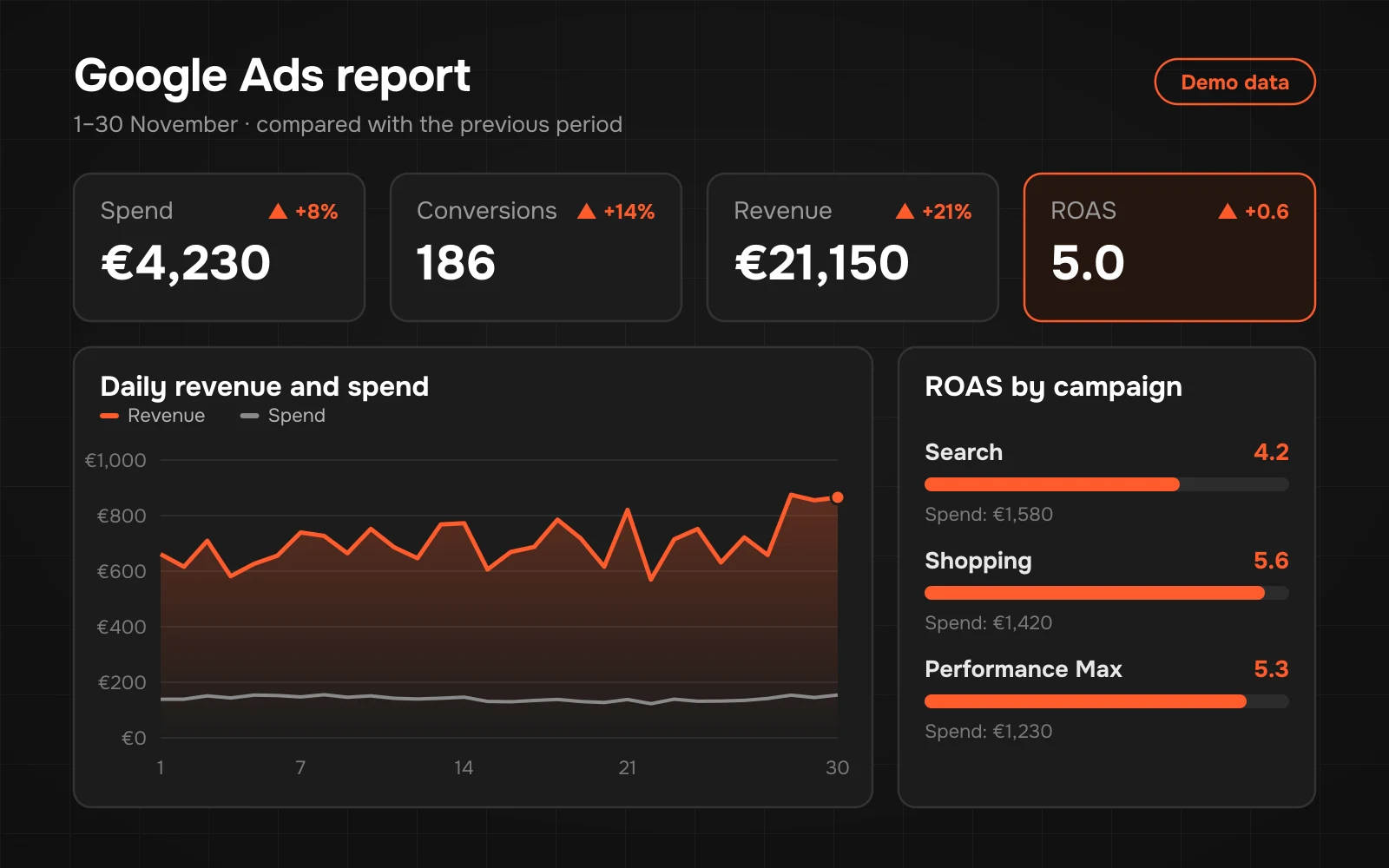
Client reporting dashboard
Transparent reporting helps clients understand what is happening with their ad budget throughout the month, not just at the end of it.
Clients can be given access to an easy-to-use reporting dashboard showing the current or regularly updated campaign performance, including:
- spend;
- impressions and clicks;
- leads or purchases;
- revenue;
- cost per result;
- ROAS;
- changes in key metrics over time.
The specific data available depends on the analytics setup, data sources and project goals. It is important not just to present the numbers, but to explain what they mean for the business and what actions should come next.
How to measure Google Ads results
A click is not a business result in itself. One business may prioritise leads, while another may focus on calls, purchases, revenue or new customers.
GA4
GA4 helps you analyse user behaviour and events on your website, such as product views, add-to-cart events, checkout starts, purchases and form submissions.
Google Tag Manager
Google Tag Manager helps you manage tags and events. This makes it possible to set up tracking systematically, without making ad hoc changes to your website code.
Google Ads conversion tracking
Conversions send information about valuable actions to your Google Ads account. This allows campaigns to optimise for actions that matter to your business, rather than just any click.
ROAS
ROAS shows how much revenue your ad spend generated. For example, if your ads spent 100 units of budget and generated 500 units of revenue, your ROAS is 5.
However, ROAS should not be assessed in isolation from margins, returns, logistics, product costs and repeat purchases. The same ROAS can be profitable for one product and insufficient for another.
CRM and lead quality
For B2B businesses and service providers, it is important to know not only how many forms were submitted, but also how many leads became qualified and how many resulted in a sale. Where needed and technically feasible, Google Ads data can be connected with a CRM or call tracking system.
Why Google Ads may not generate sales
Clicks without sales do not always mean that Google Ads “isn’t working”. First, review the entire journey from the ad to the website.
Common reasons include:
- search terms are too broad or have no commercial intent;
- campaigns have no negative keywords;
- ads lead to the wrong page;
- the landing page does not match the promise made in the ad;
- the website is slow or difficult to use on mobile;
- pricing, delivery or returns policies are unclear;
- payment is not working;
- products have been disapproved in Google Merchant Center;
- leads or purchases are not being tracked;
- the campaign is optimised for clicks when the business needs sales;
- the budget does not reflect the level of competition or the sales cycle.
A useful troubleshooting sequence is:
- Is the right audience reaching the website?
- Do the search terms match the product?
- Is conversion tracking working?
- Are there any issues on the product page or in the checkout?
- Does the result make sense for the business’s economics?
In this situation, increasing the budget straight away is not always the answer. First, find out where potential customers are dropping off.
We look at where stores lose buyers between the cart and payment in why shoppers abandon their carts.
How much does Google Ads cost?
Google Ads cost can include several components:
- the advertising budget spent with Google;
- one-off setup or preparation;
- ongoing management and optimisation;
- additional work on the website, analytics, CRM, Google Merchant Center or product feed.
There is no fixed price that applies to every project. The budget and management costs depend on competition, location, the number of products or services, campaign types, the state of the Google Ads account, analytics requirements, margins and business goals.
Rather than starting with “What is the minimum advertising budget?”, it is more useful to ask:
- how much a lead or purchase costs the business;
- what margin the product generates;
- how much demand there is in the target market;
- what data is already available in the Google Ads account;
- whether the website is ready to receive traffic.
Google Ads vs SEO: which should you choose?
Google Ads and SEO serve different purposes.
Google Ads can bring paid traffic quickly once campaigns are prepared and approved. It can be useful for testing demand, launching a new product, generating leads and scaling specific categories.
SEO builds a website’s organic visibility. It requires technical work, quality content, a well-planned structure and time for results to develop.
For many businesses, a combination works best. Google Ads can help capture and test demand now, while SEO gradually builds a long-term organic channel.
When do you need a Google Ads specialist or agency?
It is possible to launch a basic campaign yourself. However, support from a specialist can be especially useful if:
- you target several markets or languages;
- your ecommerce store has a large catalogue;
- you need Shopping or Performance Max campaigns;
- you need to set up GA4, Google Tag Manager, a CRM or end-to-end analytics;
- your ads are already spending budget, but the results are unclear;
- your team does not have time for regular optimisation;
- you need to connect advertising with your website, CRO, SEO or ecommerce operations.
When choosing a provider, consider:
- whether you retain access to your advertising and analytics accounts;
- which KPIs are agreed before work begins;
- what is included in setup and ongoing management;
- how changes to campaigns are explained;
- whether reporting is clear;
- whether the provider promises guaranteed ROAS without first analysing your business.
Conclusion
Google Ads works best when advertising is part of a broader system. That means choosing the right search terms, writing relevant ads, providing a user-friendly website, setting up accurate analytics, defining clear business goals and optimising campaigns regularly.
For an ecommerce store, this also means working with Google Merchant Center, a product feed, Shopping, Performance Max, purchase data and a clear understanding of margins. For B2B and service businesses, lead quality, the sales cycle and the connection between advertising and the CRM are especially important.
If you need to set up or optimise Google Ads for your business or ecommerce store, visit the Koshman Ecom Google Ads service page. Request a consultation, and the team can help review your current campaigns, website and analytics, and discuss possible next steps.
Frequently asked questions
What is Google Ads?
Google Ads is Google’s advertising platform for promoting products and services in Search and other Google services. Businesses set their goals, budget, locations and how they want to measure results.
How much does advertising on Google cost?
Costs include the Google advertising budget and the fees for a specialist or agency. The total depends on competition, market, product, goals, cost per lead, margins and website readiness. There is no universal price.
Do you need a website for Google Ads?
Most campaigns need a quality landing page or ecommerce store. It should match the ad, work well on mobile, explain the offer and make it easy for visitors to take the desired action.
Which is better for a store: Search, Shopping or Performance Max?
It depends on the catalogue, purchase data, goals and the level of control you need. Stores often use a combination of campaign types rather than relying on just one.
Why are there clicks but no sales?
Possible causes include irrelevant search terms, a weak product page, payment or delivery issues, a lack of trust, analytics errors or an offer that does not match the audience.
Can you set up Google Ads yourself?
Yes, you can create a basic campaign yourself. For complex catalogues, multiple markets, Shopping, Performance Max, end-to-end analytics and ongoing optimisation, a specialist is often helpful.
What is ROAS in Google Ads?
ROAS shows how much revenue was generated for the advertising spend. It should be assessed alongside margins, returns, logistics, product costs and repeat purchases.
Can clients access the reporting dashboard?
Yes. Clients can access a clear reporting dashboard with current or regularly updated figures, including spend, traffic, leads or purchases, revenue, cost per result and ROAS, depending on the analytics setup.